Energy ratings and energy models,
all in one platform.
Stop bouncing between disconnected software. MoonBIM’s built-in energy analysis module lets certified raters model every building system, run energy simulations, and generate compliance documentation—without ever leaving the platform where the project already lives.
What you get
Every energy modeling tool in one place
Model buildings from envelope to renewables, run simulations, and generate reports—all inside MoonBIM.
Integrated Energy Modeling
Build complete energy models in the same platform where you schedule and track inspections. No exports, no re-entry, no switching tools.
Envelope Modeling
Model all building surfaces—walls, roofs, windows, doors, and foundations—with guided data entry that ensures nothing is missed.
Space Conditioning
Enter HVAC systems, thermal zones, and equipment specifications with step-by-step forms that prevent missing data before simulation.
Renewables & Solar
Model photovoltaic systems, battery storage, and other renewables with accurate performance inputs that feed directly into the simulation engine.
Gap Analysis & Results
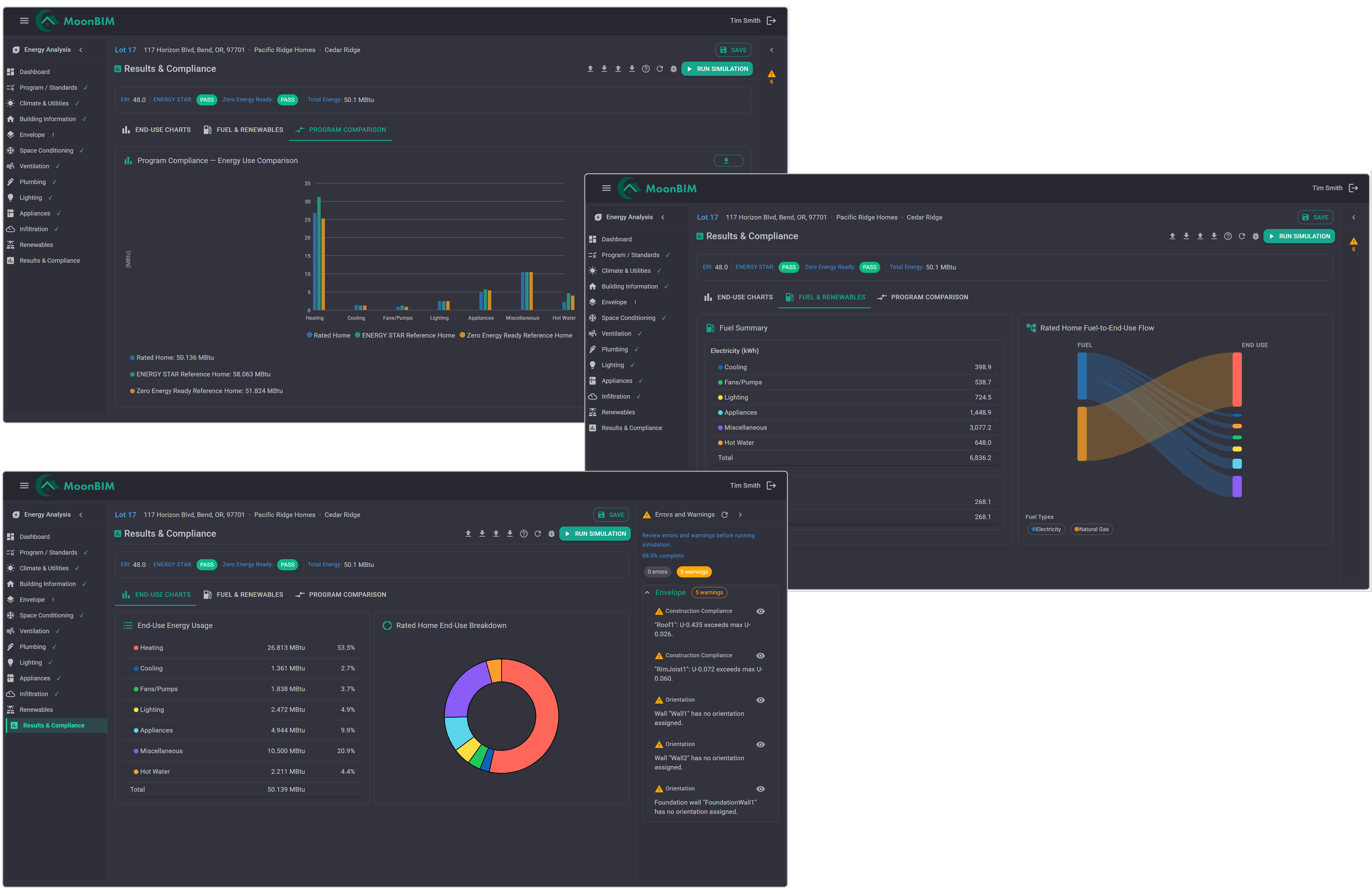
Instantly see which building systems are complete, what’s missing, and whether the model will meet program requirements before you run the final simulation.
Compliance Reports
Generate energy certificates and energy compliance documentation directly from the model—formatted and ready to submit without any manual reformatting.
How it works
Build, simulate, and report — in one workflow
MoonBIM’s energy analysis module follows the same intuitive navigation as the rest of the platform—so raters who already know MoonBIM are modeling buildings in minutes.
-
Start from the project
Open any project in MoonBIM and navigate to Energy Analysis. The building details you’ve already entered are pre-populated—no re-entry required.
-
Model each building system
Work through the guided modules—Envelope, Space Conditioning, Ventilation, Plumbing, and Renewables—with real-time completion tracking as you go.
-
Review, simulate, and report
The Gap Analysis dashboard shows you exactly what’s complete. Run the simulation, review the results, and generate compliance documents in one click.
Built for Energy Raters
Every module a rater needs, nothing they don’t
MoonBIM’s energy analysis module was designed around how certified energy raters actually work—guided data entry, intelligent validation, and a clear view of what’s complete versus what still needs attention.
-
Guided data entry for every module
Forms validate as you type, highlighting missing or invalid values before you submit—so errors surface early, not during final simulation.
-
Linked to building models
When building models are used on a project, surface areas and construction types feed directly into the energy model—no double-entry.
-
Unsaved changes protection
MoonBIM tracks unsaved changes across all energy modules and prompts you before navigating away, so no data is ever accidentally lost.
See it in action
Your complete energy modeling platform awaits
Book a 30-minute demo and we’ll walk through the full energy analysis workflow with a real project so you can see exactly how it fits your team.